

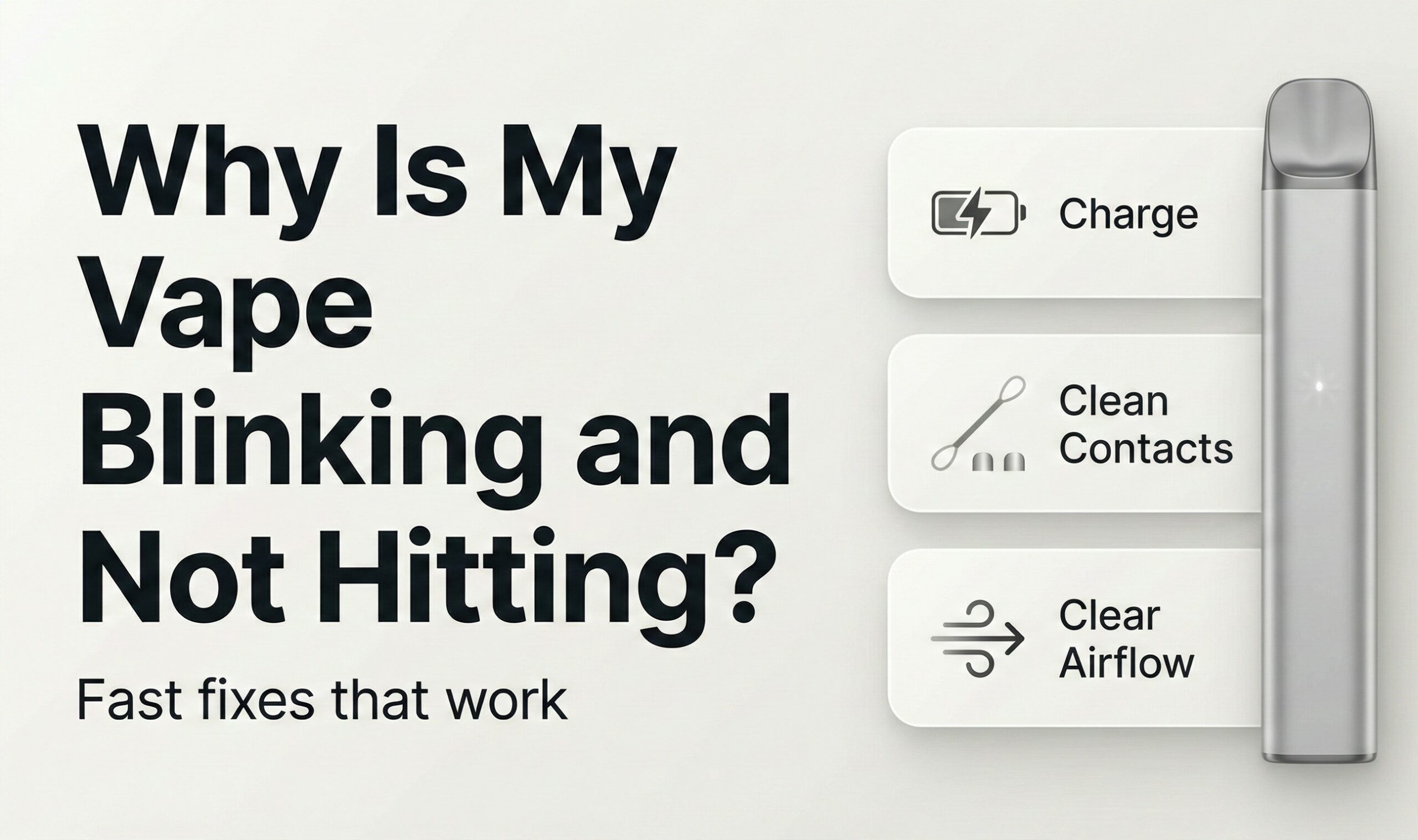
Quick answer: try these checks in order
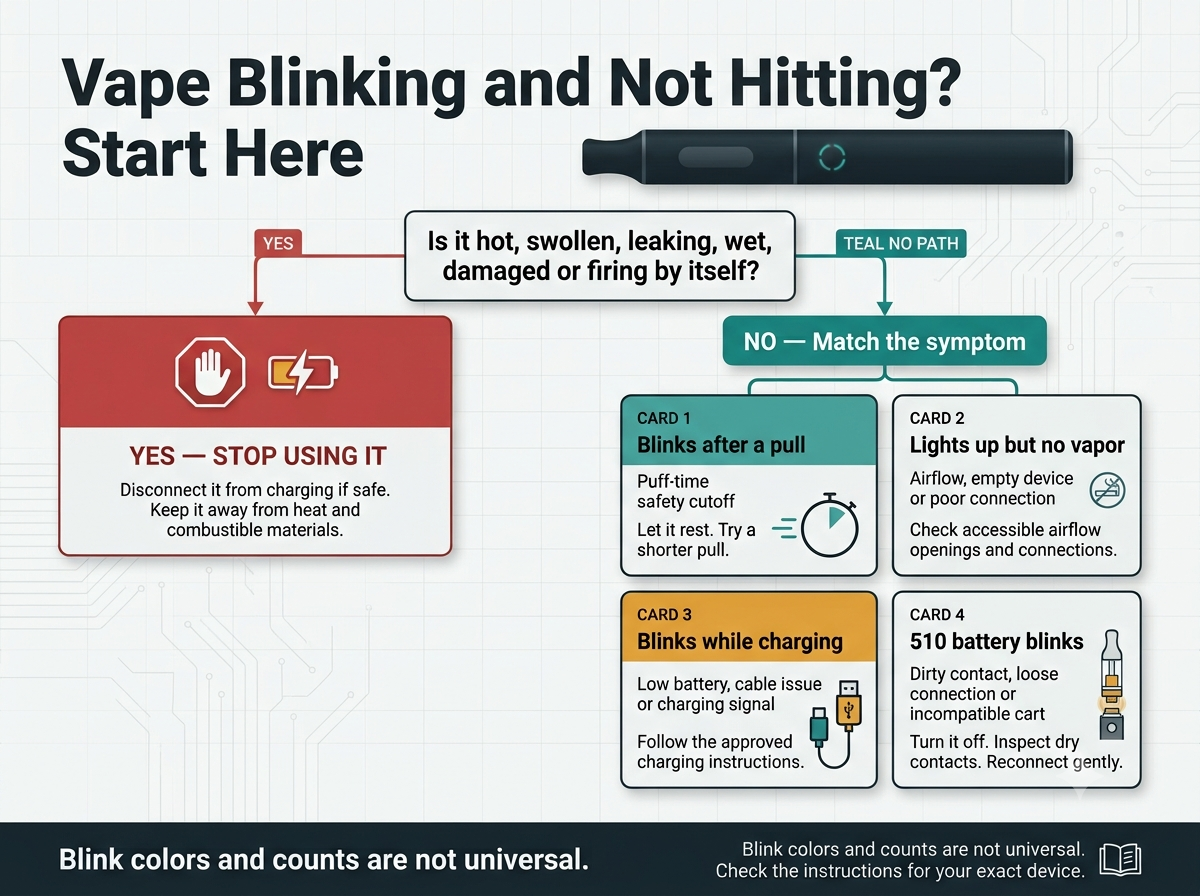
- Stop and inspect it. Do not continue if it is hot, swollen, leaking, wet, cracked, hissing, or firing by itself.
- Identify the device. A sealed disposable and a removable 510 cartridge do not use the same troubleshooting path.
- Check power correctly. Charge only a device designed to recharge, following its manufacturer instructions.
- Try a shorter pull. A long draw can trigger a normal puff-time cutoff.
- Check accessible airflow and connections. Do not open the case or insert metal tools.
Need a more specific guide? A tight or blocked draw is covered in how to unclog a disposable vape. For charging time, indicator lights, and approved charging checks, see how long a disposable vape should charge.
What Does It Mean When a Vape Blinks?
A blinking light is a status or protection signal, but its exact meaning depends on the manufacturer and model. Do not assume that three, five, or ten flashes—or a red, blue, green, or white light—always means the same thing.
| What you notice | Possible explanation | Safest first step |
|---|---|---|
| Blinks near the end of a long pull | Puff-time cutoff | Let it rest and try a shorter pull |
| Blinks and produces no vapor | Low battery, airflow restriction, empty device, or connection fault | Identify the device, then check power, airflow, and accessible connections |
| 510 battery blinks with one cartridge | Poor contact, incompatible cartridge, or cartridge failure | Turn it off, clean dry contacts, and reconnect gently |
| Blinks while plugged in | Normal charging signal or a cable, source, port, or battery problem | Check the exact model instructions |
| Blinks or fires without a pull | Possible sensor or internal fault | Stop using it and keep it away from combustible material |
Manufacturer-specific codes: Find the exact model name on the device or packaging and check its manual or official support page. A general article cannot reliably decode every color, number, screen message, or light pattern.
Troubleshooting a Vape That Blinks but Does Not Hit
Step 1: Check for a stop-use warning
Do not keep testing a device that is unusually hot, swollen, cracked, wet, leaking near the charging area, hissing, giving off an electrical smell, or activating by itself. Disconnect it from charging if that can be done safely. Keep it away from paper, bedding, curtains, direct sunlight, and other combustible material.
Step 2: Identify the device type
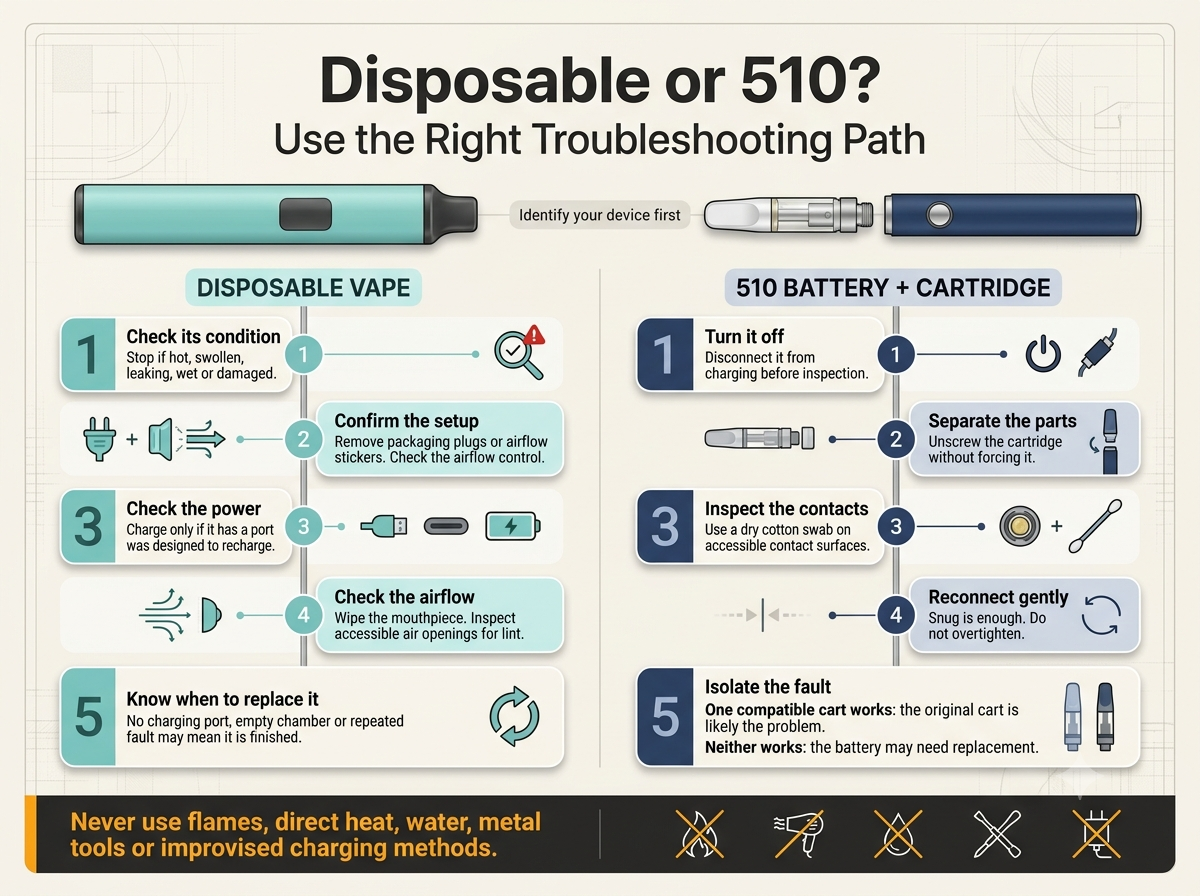
A disposable contains the oil chamber, heating element, sensor, and battery in one body. A 510 setup has a removable cartridge attached to a separate battery. With a 510 setup, you can sometimes isolate whether the cartridge or battery is responsible. A sealed disposable should not be opened for diagnosis.
Step 3: Rule out a long-pull cutoff
If the light appears only at the end of a long draw, put the device down briefly and try a shorter, gentle pull. Do not pull harder. Strong suction can draw excess oil or condensation into the airway and make a minor airflow problem worse.
Step 4: Confirm power without guessing the charge time
If the device has a factory charging port and the manufacturer identifies it as rechargeable, follow its approved charging method and completion signal. Charging times and light behavior vary. A disposable with no factory charging port should not be opened, rewired, or improvised into a rechargeable device.
Step 5: Check accessible airflow
Look for a packaging plug, sticker, closed airflow control, lint around an intake opening, or visible residue at the mouthpiece. Clean only accessible surfaces with a dry tissue, soft brush, or cotton swab. Do not push a tool deep into the airway.
Why Does a Vape Blink While Charging or After You Unplug It?
Some devices pulse or blink normally while accepting a charge; others use a solid light, changing color, blank screen, or percentage display. Blinking after unplugging can mean the battery is still too low, the cable or power source did not charge it, the device is empty, or another protection signal is active.
- Confirm that the device was designed to recharge.
- Check its packaging or official instructions for the correct power source and completion signal.
- If permitted, try a known-working compatible cable without forcing the connector.
- Inspect the port opening for visible lint, but do not insert metal or liquid cleaner.
- Stop if it becomes hot, swells, leaks, smells unusual, or flashes abnormally.
For charging duration and a fuller safe-charging checklist, read how long to charge a disposable vape.
If a 510 Battery Blinks and the Cartridge Does Not Hit
A 510 battery may blink when it cannot make a proper connection, detects an incompatible or failed cartridge, has low power, is locked, or enters protection mode. Follow this sequence without forcing the components.
Turn off and separate the parts
Turn the battery off if it has a power button, disconnect it from charging, and gently unscrew the cartridge. If the cartridge will not move normally, do not use excessive force.
Clean only accessible contact surfaces
Use a dry cotton swab to wipe the accessible battery contact and the bottom contact of the cartridge. Do not place liquid cleaner inside the battery, cartridge, or charging port. Allow no loose fibers to remain.
Reconnect without overtightening
Attach the cartridge until it is snug. Overtightening can interfere with contact or damage the threaded connection. If the battery has adjustable voltage, use only a setting supported by both the battery and cartridge instructions.
Isolate the cartridge from the battery
If you have another undamaged, compatible 510 cartridge, test it briefly on the same charged battery. If one cartridge works and the other does not, the original cartridge is the likely problem. If neither works, stop repeated testing and consult the battery instructions or replace the battery.
If a Disposable Vape Blinks but Does Not Hit
Because the parts are sealed together, use only external checks:
- Check a new device. Remove the mouthpiece plug, base sticker, or other packaging that blocks airflow. Make sure an adjustable airflow control is not fully closed.
- Check whether it can recharge. Use only its factory port and approved method. No port means no improvised charging.
- Check the draw. A tight draw points toward an airflow restriction; normal airflow with no vapor points more toward power, an empty chamber, a sensor, or failed hardware.
- Let a cold device return to room temperature. Leave it upright indoors. Do not use direct heat or keep a malfunctioning device against your body.
- Recognize the end of its life. A non-rechargeable battery, empty chamber, persistent internal fault, or repeated overheating normally means replacement—not disassembly.
Why Does It Light Up but Produce No Vapor?
A working light confirms only that part of the device is responding. It does not prove that oil is reaching the heating element or that the cartridge, coil, sensor, and battery are working together.
- Tight or blocked draw: check accessible airflow openings and follow the safe disposable vape unclogging steps.
- Normal airflow but no vapor: check approved charging support, remaining oil, and—on a 510—cartridge contact and compatibility.
- Gurgling or liquid near the mouthpiece: stop pulling harder, wipe the visible opening, and let the device stand upright.
- Persistent burnt or harsh taste: stop using it. An empty chamber, dry wick, overheated coil, or failed hardware may be involved. See why a disposable vape tastes burnt.
- Brand-new device with normal setup but no response: preserve the packaging and receipt and use the seller or manufacturer return process rather than opening it.
Unsafe Vape Fixes to Avoid
- Do not use a flame, stove, radiator, hot water, heating pad, or hair dryer.
- Do not soak or rinse a vape, battery, cartridge, or charging port.
- Do not push needles, paper clips, knives, or other metal tools into the device.
- Do not open a sealed disposable, expose its battery, strip a cable, or bypass its charging circuit.
- Do not use an unsuitable fast charger simply because the plug fits.
- Do not leave a vape charging overnight, on bedding, or unattended.
- Do not keep pulling from a device that is overheating, auto-firing, leaking, or behaving unpredictably.
Battery-safety reminder
The FDA’s vape-battery guidance recommends understanding the manufacturer’s instructions, keeping devices away from extreme temperatures, and charging on a clean, flat surface away from items that can catch fire.
How to Prevent Blinking and No-Hit Problems
- Store an undamaged oil-based device upright at normal room temperature.
- Use short, gentle pulls and pause between them.
- Keep accessible airflow openings and 510 contacts clean and dry.
- Do not overtighten a 510 cartridge.
- Use only compatible cartridges and manufacturer-supported settings.
- Keep the device out of direct sun and parked vehicles.
- Inspect the case and charging area before plugging it in.
When Should You Stop Troubleshooting or Replace It?
Stop using the device immediately if it is swollen, cracked, wet, hissing, giving off an electrical smell, leaking into the charging port, unusually hot, or firing by itself. Replacement is also the practical next step when:
- a non-rechargeable disposable is depleted;
- approved charging and external checks do not restore operation;
- the device repeatedly enters protection mode;
- a compatible cartridge test indicates that the battery has failed;
- the oil chamber is empty or the coil produces a persistent burnt taste; or
- the manufacturer recommends replacement or warranty service.
Do not place an e-cigarette or its lithium battery in household trash or curbside recycling. The EPA’s guidance for individuals recommends using an appropriate household hazardous-waste collection option.
Choosing a replacement
Confirm battery and cartridge compatibility before ordering. Adults can review current CBD vape cartridges or read what to check before choosing a CBD vape cartridge. Availability and shipping restrictions can change.
Frequently Asked Questions
Why is my vape blinking and not hitting?
The common possibilities are low power, a long-pull cutoff, blocked airflow, a poor cartridge connection, an empty device, overheating protection, or failed hardware. Start with the stop-use warning signs, then identify whether you have a disposable or a 510 setup.
Why does my vape blink when I pull?
If it blinks only after a long draw, a puff-time cutoff may be working normally. Try a shorter pull. If it flashes immediately with every attempt, check power, airflow, and—on a 510—cartridge contact and compatibility.
Why does my disposable vape blink after charging?
It may still have a low battery, the cable or power source may not have charged it, or the light may be reporting a cutoff, empty chamber, airflow problem, or internal fault. Use the exact model’s charging instructions rather than judging by elapsed time alone.
Why is my disposable vape lighting up but not hitting?
Check for packaging that blocks airflow, a closed airflow control, a tight draw, low power, or an empty chamber. If airflow is normal and the device is charged but still produces no vapor, the sensor, coil, or internal connection may have failed.
Why does my cart battery keep blinking?
Possible causes include low charge, a locked battery, a dirty or loose contact, an incompatible cartridge, or protection mode. Turn it off, clean only the accessible dry contacts, reconnect the cart gently, and consult the manufacturer’s blink-code instructions.
Why does it blink three, five, or ten times?
There is no universal meaning for a particular number of flashes. The same blink count can mean something different on another brand or model. Check the exact device manual or official manufacturer support page.
Can a clogged vape cause blinking?
Restricted airflow can prevent an inhale-activated device from working normally, but blinking can also come from power or protection issues. If the draw is tight, investigate airflow. If air moves normally but no vapor appears, check power, remaining oil, and connections.
Can I fix a disposable by opening it?
No. Do not open a sealed disposable, expose the battery, attach wires, refill a non-refillable chamber, or bypass its safety circuit. Use external checks only, then replace or return it when those checks fail.
What should I do if the vape blinks or fires by itself?
Stop using it. Disconnect it from charging if safe, keep it away from heat and combustible material, and follow the manufacturer’s fault and disposal instructions. Do not carry an auto-firing device against your body.
Sources and Safety References
- U.S. Food and Drug Administration: Tips to Help Avoid Vape Battery Fires or Explosions
- U.S. Environmental Protection Agency: How to Safely Dispose of E-Cigarettes
Adult-use and safety note: This article provides general product troubleshooting, not medical advice or a substitute for the instructions supplied with a specific device. Vaping is not risk-free. Keep all vape products away from children and pets.
Do not drive or operate machinery after using a product that may impair you.
3 thoughts on “Why Is My Vape Blinking and Not Hitting? (Disposable + 510 Fix Guide)”